AI web design has moved well beyond generating a quick layout from a prompt. Today’s tools can help with page structure, wireframes, copy, images, responsive layouts, prototypes, design iterations, and even production-ready website sections.
That does not mean businesses can simply type “build me a website” and expect a strong digital presence.
The most useful role of AI is to speed up parts of the design process while people still make the decisions that affect branding, user experience, functionality, search visibility, and conversions.
For businesses that need more than a generated template, professional web design and web development can combine AI-assisted efficiency with strategy, custom functionality, brand direction, and technical development.
So, what can AI actually do for web design in 2026, which tools are worth considering, and where is human input still essential?
What Is AI Web Design?
AI web design is the use of artificial intelligence to assist with creating, editing, or improving websites.
Depending on the software, AI can help generate:
- Website layouts and page sections
- Wireframes and early design concepts
- Headlines and website copy
- Images, illustrations, and other visual assets
- Responsive versions of layouts
- Code and interactive components
- Content structures and CMS entries
- Design variations based on a prompt
- Basic SEO, accessibility, and content recommendations
Some AI website builders can take a business description and produce a first version of an entire site. Others work alongside professional designers rather than replacing the design process.
That distinction matters.
An AI-generated web design may give you a fast starting point. A business website still needs to answer much bigger questions: Who is the audience? What should visitors do next? What information do they need? What makes the company different? How should the site support search, paid advertising, sales, and future growth?
Benefits of Using AI in Web Design
AI can make parts of website production considerably faster when it is used for the right tasks.
Faster First Drafts
Starting from a blank canvas can take time. Web design AI tools can quickly suggest layouts, page hierarchies, content sections, and visual directions that designers can then evaluate and refine.
This is particularly useful during early ideation and prototyping.
More Design Variations in Less Time
Instead of manually creating several versions of a section, AI can help explore alternative structures, imagery, messaging, and visual directions.
The designer can then choose what actually works for the user and the brand.
Faster Content Production
AI can help produce first drafts of headings, product descriptions, calls to action, FAQs, and other website copy.
It should not automatically become the final copy. Brand voice, factual accuracy, search intent, conversion strategy, and customer language still need review.
Custom Visual Creation
Generative AI tools can create backgrounds, concept imagery, product settings, illustrations, and visual variations that would otherwise require stock photography or a larger production process.
Quicker Responsive Design Exploration
Some modern tools can help adapt layouts for different screen sizes or suggest responsive changes. Framer, for example, allows its AI agent to assist with adapting designs across desktop, tablet, and mobile breakpoints.
That can save production time, but the results should still be tested on actual devices and common screen sizes.
More Time for Higher-Value Decisions
The biggest advantage is not that AI makes designers unnecessary.
It is that repetitive work can take less time, giving designers and developers more room to focus on navigation, usability, brand positioning, conversion paths, accessibility, custom functionality, and the overall customer experience.
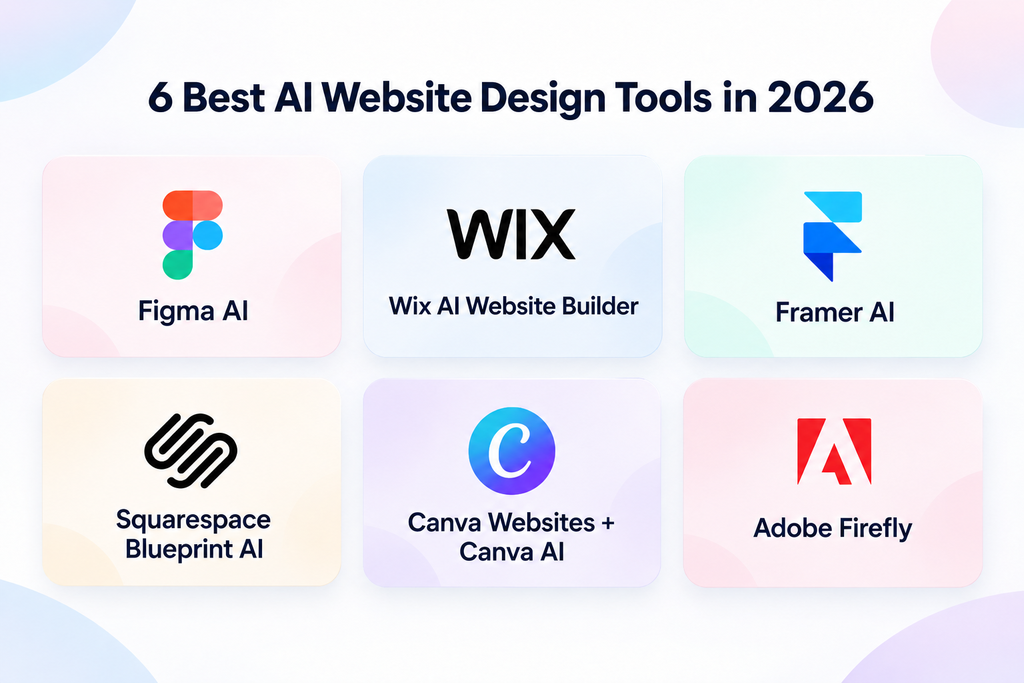
6 Best AI Website Design Tools in 2026
There is no single best web design AI for every project. The right choice depends on whether you need wireframes, a complete website, visual assets, prototypes, or a professional design environment.
Here are six current options worth knowing.
1. Figma AI
Best for: Professional UI/UX design workflows
Figma has added AI directly to its design environment, including an AI agent and tools that assist designers while they work. Figma describes its AI features as a way to get started faster, find information, and make changes without leaving the design workflow.
That makes it much more relevant to professional designers than a simple prompt-to-template builder.
Figma is particularly useful when a website requires proper UX planning, reusable design systems, collaboration, prototypes, and developer handoff.
2. Wix AI Website Builder
Best for: Small businesses that want an all-in-one builder
The older Wix ADI referenced in many AI web design articles is no longer Wix’s current product. Wix says ADI was retired for new websites in November 2024.
Its current AI website builder can create pages, sections, visuals, and website elements from conversational prompts while still allowing manual editing.
That makes it useful for smaller projects where speed and ease of management matter more than completely custom development.
3. Framer AI
Best for: AI-assisted marketing sites and landing pages
Framer combines AI generation with a visual website canvas.
Users can describe a page or website and generate editable sections, copy, visuals, and layouts. The resulting website remains editable, including typography, components, breakpoints, CMS content, and interactions.
This makes Framer useful when you want AI speed but still need more design control than a basic AI website generator offers.
4. Squarespace Blueprint AI
Best for: Service businesses, portfolios, and straightforward business websites
Squarespace’s Blueprint AI Builder creates a website starting point based on information about the business, including layouts, styling, and copy suggestions.
The generated website can then be customized using Squarespace’s existing editing tools.
It can be a practical option for businesses that want to launch quickly and do not need complex custom functionality.
5. Canva Websites + Canva AI
Best for: Simple landing pages, campaign pages, and visual-heavy microsites
Canva’s website builder now combines its drag-and-drop website tools with AI-generated visuals, copy, and interactive elements.
It is particularly useful when the website is closely connected to a broader campaign and the same team is already producing presentations, advertisements, social assets, and other visual material in Canva.
It is less suitable for complex websites that require advanced functionality or heavily customized development.
6. Adobe Firefly
Best for: AI-generated website visuals
Adobe Firefly is different from the full website builders above.
Its strength is producing and editing creative assets. Designers can generate images from prompts, work from reference images, create variations, remove or add elements, and refine visuals before using them within a website design.
For teams that already have a website design process but want AI to improve visual production, this can be more useful than replacing the website builder itself.
Which AI Web Design Software Should You Choose?
The right AI web design software depends on what you are actually trying to accomplish.
If you need a straightforward small-business website, an AI website builder may be enough to create the initial structure.
If you need a distinctive brand experience, complex customer journeys, ecommerce functionality, integrations, advanced lead generation, or custom features, AI should usually become part of the workflow rather than the entire workflow.
For example, an ecommerce company may use AI for product imagery or early layouts while relying on professional Shopify development for the storefront architecture, integrations, checkout experience, and ongoing scalability.
A business building a dashboard, portal, or interactive digital product may instead need web application design and development.
How to Use AI to Make a Website
The strongest AI-assisted websites are usually not created with one prompt. They are built through several stages.
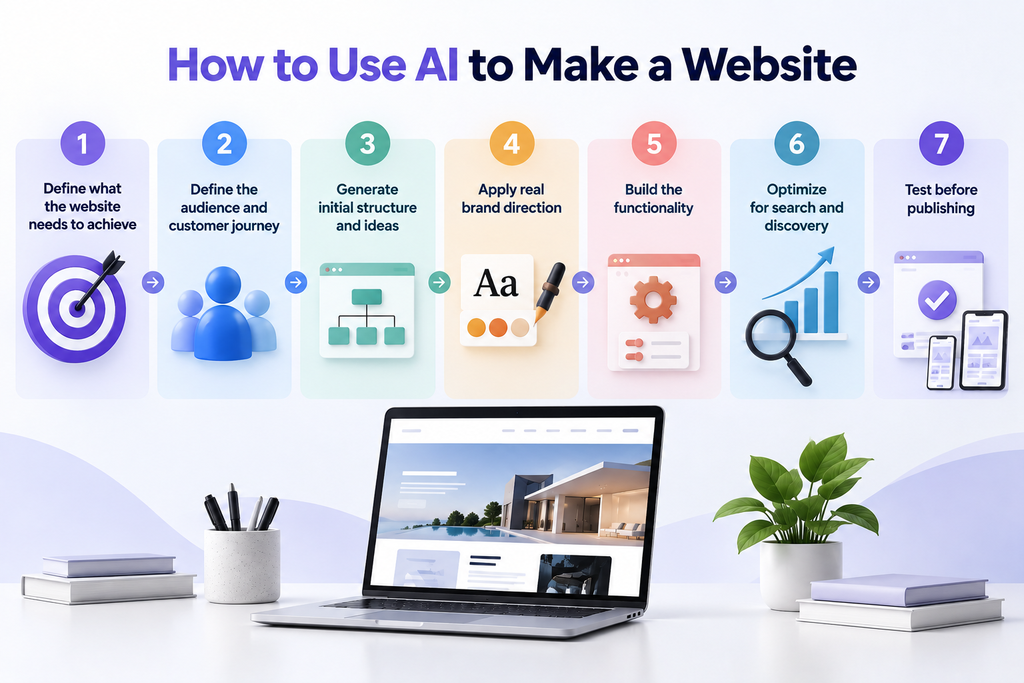
Step 1: Define what the website needs to achieve
Start with the business goal rather than the design tool.
Do you need leads? eCommerce sales? Bookings? Product education? Investor credibility? Customer self-service?
Those goals determine the structure of the website.
Step 2: Define the audience and customer journey
Identify who will visit the site, what questions they are likely to have, and what action you want them to take.
AI can suggest page structures, but it does not automatically understand your customers better than your business does.
Step 3: Generate initial structure and ideas
Use AI to explore possible sitemaps, wireframes, layouts, content sections, and design directions.
This stage is ideal for rapid experimentation.
You can also follow a more structured web design process rather than moving directly from a prompt to a published page.
Step 4: Apply real brand direction
Replace generic AI choices with your actual typography, colours, photography direction, tone of voice, visual system, and brand standards.
If the brand itself needs stronger positioning before the website is developed, branding should come before automatically generating dozens of website pages.
Step 5: Build the functionality
Forms, ecommerce systems, customer portals, CRM integrations, product filters, booking systems, calculators, account areas, and other business features still need to work reliably.
For businesses that want AI itself built into the customer experience, custom AI software development can go far beyond using AI simply to create the website.
Step 6: Optimize for search and discovery
An attractive website still needs to be discoverable.
Review page titles, headings, internal linking, crawlability, structured content, page speed, content quality, and search intent before launch.
Our Search Engine Optimization services focus on helping websites become easier for search engines and users to understand.
As AI-driven discovery grows, businesses can also consider how their site content is structured for answer engines through Generative Engine Optimization.
Step 7: Test before publishing
Check the site on multiple devices and browsers.
Test forms, buttons, menus, checkout flows, links, loading speed, analytics, tracking, accessibility, and conversion actions.
AI can assist with review, but it should not replace proper quality assurance.
AI-Generated Web Design vs. Professional Web Design
AI website builders are useful, but the decision is not really “AI or designer.”
Increasingly, professional web designers use AI themselves.
The more useful comparison is AI-only website generation versus AI-assisted professional web design.
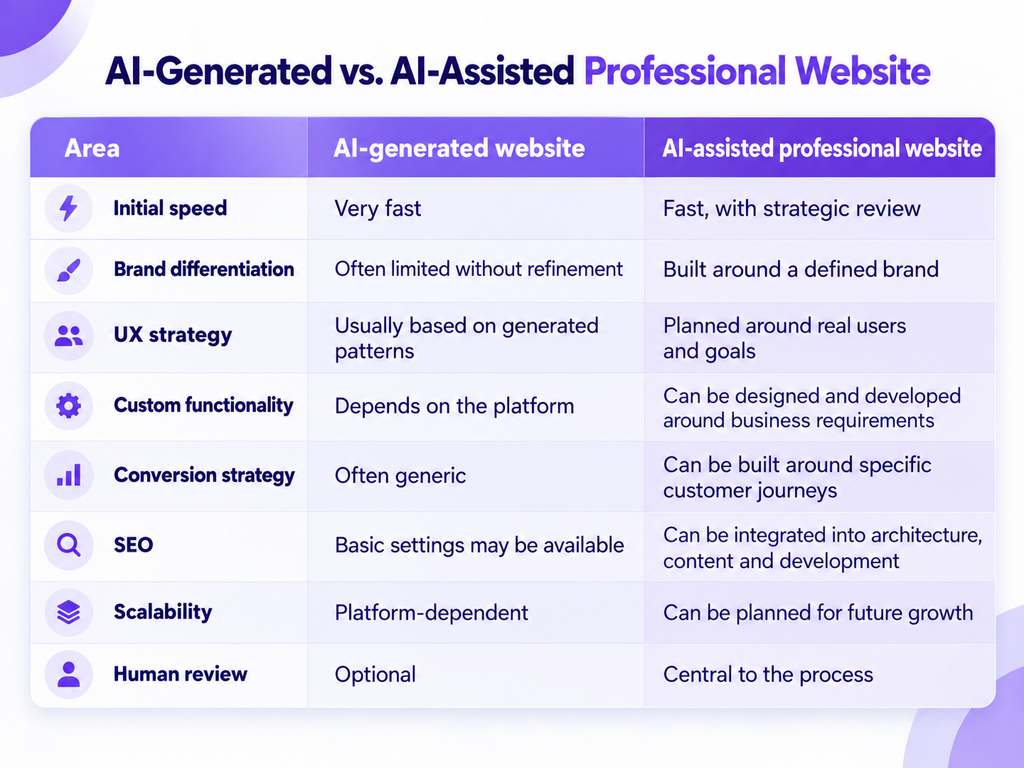
For a temporary campaign page or simple portfolio, an AI website builder may be all you need.
For a website expected to generate leads, support paid campaigns, rank organically, process transactions, integrate with business systems, or represent a serious brand, the requirements are usually broader.
How Digilite Used AI-Generated Visuals for The SoundPod
AI does not have to design the entire website to make a meaningful contribution.
For The SoundPod, Digilite combined web design, web development, custom product experiences, and AI-generated imagery.
The project began with Elementor templates for efficiency, but the website was customized around the brand rather than leaving the default template structure intact.
Product pages included colour selection, custom colour options, and direct enquiry forms. At the same time, AI-generated imagery was used for many of the furniture, chairs, tables, and supporting visuals displayed throughout the site.
The products themselves were real. AI was used to create more consistent, brand-aligned settings and imagery instead of relying heavily on generic stock photography.
That is a good example of where AI web design can be most effective: using AI for the parts it can accelerate while keeping brand, UX, development, and customer experience under human control.
Digilite’s public project portfolio lists The Sound Pod under AI-Generated Visuals, Web Design, and Web Development.
How Major Brands are Using Generative AI in Creative Work
AI-assisted creative production is not limited to small businesses or experimental websites.
Coca-Cola, for example, launched its Create Real Magic platform with OpenAI and Bain & Company. The project combined GPT-4 and DALL-E and allowed digital creators to produce artwork using Coca-Cola’s existing brand assets.
The important lesson for web design is not that Coca-Cola handed its brand to an AI generator. It did the opposite: AI creation happened inside a recognizable brand system using established assets.
That is a much more useful model for businesses considering AI-generated web design.
What AI Still Gets Wrong in Web Design
The speed of AI can also create problems.
A generated page can look polished while still having weak messaging, confusing navigation, poor accessibility, unnecessary sections, generic imagery, inaccurate content, or a customer journey that does not match the business.
Even AI product companies caution users to review outputs. Figma, for example, explicitly notes that AI outputs can be misleading or wrong and should not replace expert review or research.
That is why publishing the first generated result is rarely the best approach.
The quality comes from what happens after generation: editing, testing, simplifying, checking, and making intentional design decisions.
Key Factors to Consider When Selecting an AI Tool for Web Design
Before choosing an AI website builder or design platform, look beyond how impressive its demo appears.
Consider:
- Editing control: Can you change everything the AI generates, or are you restricted to predefined layouts?
- Responsive design: Can the layout be properly adjusted across desktop, tablet, and mobile?
- SEO controls: Can you manage metadata, URLs, redirects, headings, indexing, structured information, and other search requirements?
- CMS capabilities: Can your team maintain content easily once the website grows?
- Integrations: Does the platform connect with the CRM, ecommerce system, analytics platform, forms, booking software, or other tools your business needs?
- Accessibility: Can you properly control typography, colour contrast, keyboard behaviour, alt text, semantic structure, and other accessibility requirements?
- Ownership and portability: What happens if you eventually need to move the website elsewhere?
- AI usage terms: Review how generated assets can be used commercially and what happens to information uploaded into the platform.
- Scalability: A tool that works for a five-page brochure site may not work equally well for a large ecommerce store, web application, multilingual site, or custom customer portal.
Will AI Replace Web Designers?
AI is more likely to change web design work than eliminate the need for designers.
The mechanical parts of production are becoming faster. Creating an initial section, resizing assets, generating a layout variation, drafting copy, or producing placeholder imagery may require much less manual work than before.
But businesses do not hire a web designer simply because they need someone to move boxes around a screen.
They need someone to decide which boxes should exist, what should be inside them, what should happen when someone interacts with them, and how the entire experience supports the business.
That requires judgement.
The Future of AI in Web Design
AI will increasingly become part of normal website production rather than a separate category of software.
Tools such as Framer are already moving from one-time page generation toward agents that can help design, edit, maintain, review, and analyse websites inside the same environment.
At the same time, Figma, Adobe, Canva, Wix, Squarespace, and other major platforms are bringing AI deeper into existing creative workflows.
That means the question will gradually change from:
“Was this website made with AI?”
to:
“Was AI used intelligently to make this website better?”
For businesses, that is the more important question.
The goal is not to generate as much as possible. It is to create a website that looks credible, communicates clearly, works properly, gets found, and turns the right visitors into customers.
Turn AI Into a Better Website, Not Just a Faster One
AI can make website creation faster. The real opportunity is using that speed without sacrificing the parts that make a website useful to the business.
At Digilite, we combine design, development, digital marketing, and AI capabilities to create websites around real customer journeys and business goals.
Whether you need a new website, a redesign, an ecommerce experience, or a custom digital product, our team can help you decide where AI adds value and where custom strategy and development matter more.
Frequently Asked Questions (FAQs)
1. Can AI build an entire website?
Yes. Some AI website builders can generate page structures, layouts, copy, images, and other website elements from prompts.
However, generating a website and building an effective business website are not necessarily the same thing. Strategy, branding, UX, SEO, functionality, analytics, testing, and conversion planning may still require professional input.
2. What is the best AI for web design?
There is no single best option for every project.
Figma is suited to professional design workflows, Framer combines AI generation with detailed website editing, Wix and Squarespace are useful for all-in-one website creation, Canva works well for simple visual websites and campaign pages, and Adobe Firefly is useful for generating creative assets.
Choose according to the type of website you are building rather than the number of AI features advertised.
3. Is AI-generated web design good for SEO?
It can be, but AI generation itself does not make a website search-friendly.
Search visibility still depends on factors such as technical accessibility, crawlability, content quality, search intent, internal linking, page performance, site structure, and authority.
AI can assist with some of those tasks, but the website still needs a proper SEO strategy.
4. Can AI replace a professional web designer?
AI can replace or accelerate individual production tasks, but it does not automatically provide the brand judgement, UX strategy, business understanding, technical planning, and conversion thinking required for more complex websites.
For many professional projects, the stronger approach is AI-assisted design rather than AI-only design.
5. Can I use AI-generated images on a business website?
Potentially, but businesses should review the terms of the specific tool and model being used.
Policies differ between platforms and can change over time. Adobe, for example, states that its Firefly models are designed for commercially safe creative use, but businesses should still review the applicable terms, especially when third-party models, uploaded assets, trademarks, or recognizable people are involved.
6. Should I use an AI website builder or hire a web design agency?
An AI website builder can work well when the site is simple, the budget is limited, and the business can work within the platform’s existing functionality.
Professional web design is more useful when the website needs distinctive branding, custom UX, integrations, ecommerce, advanced lead generation, technical SEO, custom development, or a long-term growth strategy.